Why Your S650 Mustang’s Sync 4 Update Keeps Failing
You get the notification. Update ready to install. You park the car, shut it off, lock the doors, walk away, and come back an hour later expecting a fresh Sync 4 build.
Instead, you get one word: Interrupted.
So you try again. Same result. You turn off Wi-Fi, turn it back on, try overnight, try in the driveway, try in the garage. Interrupted, interrupted, interrupted. Meanwhile, the Ford support site cheerfully informs you that it has been more than 90 days since your vehicle last received an update, which does nothing to improve your mood.
If this is you, there is a very good chance the problem has nothing to do with your Wi-Fi, your Ford account, your dealer, or a bug in Sync itself. It is almost certainly your battery.
Updated August 2026 to reflect Ford’s current OTA cadence, which has changed substantially since the S650 launched.

The short answer
The seventh-generation Mustang will not install an over-the-air update if the 12-volt battery charge is too low. Owners who have called Ford support after a failed install have been told outright that their battery was well below the required threshold, with the practical cutoff landing around 80 percent state of charge.
The car does not tell you this. It does not say “battery too low to update.” It says Interrupted, which sends you chasing network problems for a week.
Once owners put the car on a battery charger or maintainer overnight and tried the next morning again, the update went through on the first attempt. This has been reproduced enough times across the community that it is no longer a theory. It is the answer.

Why voltage matters this much
An over-the-air update isn’t a single download. It is a coordinated write across multiple control modules, and the car has to keep those modules awake and powered through the entire process without the engine running.
If the write gets interrupted partway through because voltage sags, you do not get a failed update. You get a bricked module and a flatbed ride to the dealer. Ford builds in a hard voltage floor specifically to make sure that never happens. From a liability standpoint, it is the right call. From an owner standpoint, it is maddening, because the car refuses to explain itself.

This is also why the problem hits some owners constantly and others never. If your Mustang is a weekend car, a garage queen, or a daily driver that mostly sees short trips, the alternator never gets enough sustained runtime to bring the battery back to full. Add a modern car’s parasitic draw from always-on modules and telematics, and you have a battery that lives permanently in the 60 to 75 percent range. Plenty of charge to start the car. Not enough to satisfy the update.
How to tell if this is your problem
A few signs point squarely at voltage:
The update fails at the same point every time. Consistent failure is a threshold being tripped, not a random network hiccup.
Your dash voltage reading and your multimeter disagree. One owner measured 12.6 volts at the terminals after a six-hour charge while the dash was still reporting 11.5. The battery monitoring system tracks state of charge over time, not just resting voltage, and it can lag well behind reality after a deep discharge.
You have had other electrical oddities. Glitchy steering wheel controls, drive modes that do not respond, a screen that reboots on its own, warning messages that appear and vanish. These cluster together because they share a root cause.
The car sits for days at a time between drives. This is the single strongest predictor.
What actually fixes it
Put the car on a quality battery maintainer and leave it long enough to reach a full charge. Not thirty minutes. Overnight, or longer if the battery has been low for a while.
Then attempt the update again. Most owners report it completing on the first try afterward.
Worth being precise about what is happening here, because the community made this point well and it is the correct framing: the maintainer does not fix the problem. It gets you around the problem. If your battery cannot hold a charge through normal use, the failed updates are a symptom, not the disease. A battery that repeatedly drops below the update threshold on a car under two years old is worth testing, and it is a warranty conversation with your dealer, not a permanent trickle-charger conversation.
That said, a maintainer is smart ownership regardless. Any modern performance car that sits more than a few days a week benefits from one, and the S650 in particular seems allergic to a weak battery in ways earlier generations were not.
What the spinning wheel actually means
There is a second failure mode worth separating out. Some owners never reach the Interrupted message at all. They get stuck on a spinning loading indicator that never resolves.
That is a different signal. It generally points to the modem dropping its connection partway through the process rather than a voltage floor being hit. The download side of the transaction failed, not the install side.
Owners have reported clearing this with a full electrical reset, but this is a case where the community fix and the recommended path diverge. Pulling battery cables on a car under warranty will clear stored settings and adaptive learning, and depending on what state the modules were left in, it can complicate things rather than simplify them. If your car is stuck in a loop it cannot exit on its own, that is a dealer visit. Let them handle it with the proper diagnostic tooling.
Check whether an update is even waiting for you
Before you troubleshoot a failure, confirm there is something to fail.
The FordPass app is not the most complete source here. The support section of Ford’s website gives a fuller picture when you sign in or enter your VIN, including whether an update has been dispatched to your specific vehicle and when.
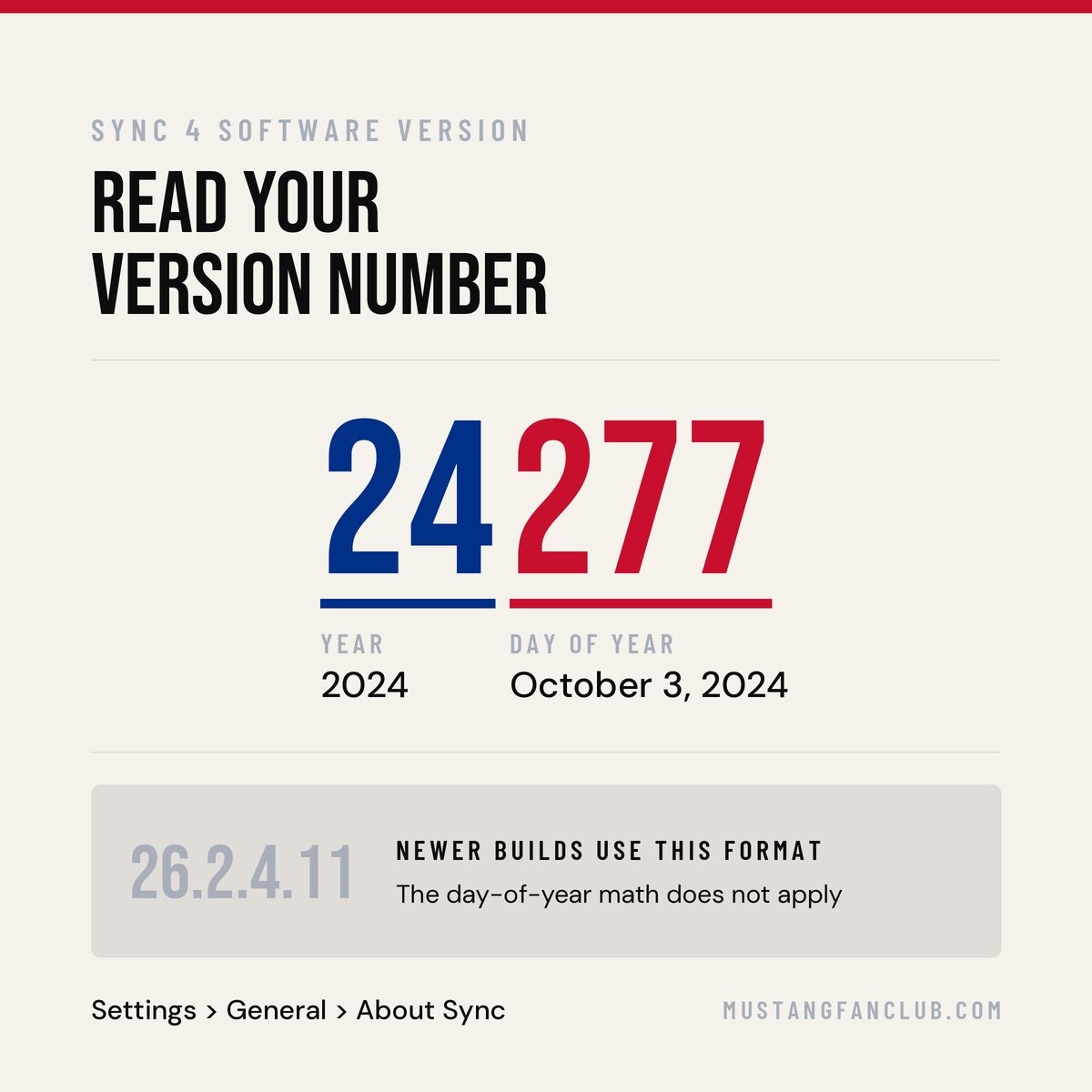
You can also verify what you are currently running from inside the car under Settings, then General, then About Sync. That screen reports a software version and a revision number.
One wrinkle worth knowing. Cars that shipped with the original factory load report a five-digit version like 24277, and those digits are not random. The first two are the year and the last three are the day of that year, so 24277 was built on the 277th day of 2024. Newer builds use a different format that looks more like 26.2.4.11, so if your screen shows something like that, the day-of-year math doesn’t apply. Either way, write it down. Comparing your string against what other owners with similar build dates are running is the fastest way to know whether you are actually behind.
“It has been more than 90 days” means something different now
This message used to be nothing to worry about. That has changed, and it is the single biggest thing to understand about S650 updates in 2026.
For the first eighteen months or so of the car’s life, long droughts were the norm. Owners went the better part of a year on their factory software load; the Ford site told them nothing had shipped in 90 days, and that was accurate. Ford simply was not pushing much to these cars.
That is no longer the case. Through 2026, S650 owners have been receiving updates at a steady clip, with waves landing in January, March, April, and May, and some owners reporting several arriving back-to-back within weeks. The pipeline is active.
So if your car has genuinely received nothing in the last several months while other owners with similar build dates are collecting updates, that’s worth investigating rather than shrugging off. It was normal in 2024. It is a fair question in 2026.
Also worth knowing: these updates are not cosmetic. Recent waves have changed actual vehicle behavior. Owners have reported the auto stop-start default flipping, and audio now cutting immediately when a door opens rather than fading out on a delay. If your car feels slightly different after a notification, you are not imagining it.
They do not always install the way Ford describes
Ford’s official guidance is that updates install while the vehicle is parked, typically overnight, on a schedule you set.
Real-world reports from owners are looser than that. Multiple S650 owners have had updates complete while they were driving, receiving the completion notification mid-trip on the highway. There is also an ongoing debate about whether Wi-Fi is required at all, since some owners who never connected the car to a home network still received updates over the built-in modem, while others report that connecting to Wi-Fi triggered a run of updates in quick succession.
The practical takeaway: connect the car to Wi-Fi if you can, because it appears to help, but do not assume a missing Wi-Fi connection is your problem.
Why you are reading about SU12 and not getting it
Ford has been rolling out a broad connectivity update called SU12 from June 2026 through the third quarter, and coverage of it is everywhere right now. It adds video streaming and karaoke apps to larger screens, improved CarPlay and Android Auto connections, EV charging features, and a one-time prompt to review your data privacy settings.
Your Mustang is not on the list. SU12 targets specific model years of the F-150, Lightning, Mach-E, Bronco, Expedition, Navigator, and Transit. The S650 is not included.
This trips up a lot of owners because Ford’s OTA program is one umbrella with many separate campaigns underneath it. Seeing headlines about a Ford software update does not mean anything is queued for your car. Check your VIN, not the news.
Why you might never see an update at all
Some owners have automatic updates enabled, solid Wi-Fi, a healthy battery, and still report going a year or more without receiving anything.
A few things are going on. Not every campaign touches every module, and only certain module updates change the version string you can see. A car can receive a legitimate update that changes nothing on the About Sync screen. Regional and market differences also apply. And in some markets, S650S were delivered without the software update menu or Wi-Fi functionality at all.
If you believe your car is genuinely being skipped rather than simply not needing anything, that is a question for your dealer with your VIN in hand. They can pull the full campaign and OTA history from Ford’s system and tell you definitively what has and has not been applied.
No, you cannot do this yourself with a USB stick
Older Sync generations let owners sideload updates from a flash drive. That door is closed.
Power-Up updates on the S650 install either over the air or through Ford’s dealer-level diagnostic system, which requires an active subscription and a hardware interface that costs real money. Copying files to a USB drive will not do anything. If the OTA path is broken on your car, the dealer path is the only other path.
When to stop troubleshooting and book service
Get it into the dealer if:
- The battery drops below the update threshold repeatedly despite regular driving and charging
- The car is stuck in a loop; it will not exit
- An update failed partway through, and something has behaved differently since
- You have an open recall or field service action involving control module software
That last point matters more than people realize. Software campaigns are not always optional convenience updates. S650 owners have seen multiple powertrain control module software campaigns, including 25SA7 and, more recently, 26E04. Dealers apply these regardless of whether your OTA pipeline is working, and they are worth checking by VIN rather than waiting to be contacted.
Bottom line
Nine times out of ten, an S650 that will not take an update has a battery that is not charged enough to safely take one. Charge it properly, try again, and it goes through.
The tenth time, it is a modem or a module issue that belongs in a service bay, not in a forum thread at midnight.
And if your car has been offered nothing at all for months while other S650s are collecting updates, do not write it off as Ford’s release cadence the way you reasonably could have a year ago. The pipeline is running now. Get your VIN checked.
This is part one of our Sync 4 series. Next up: what to do when Sync 4 freezes and reboots while you are driving.